
延迟任务实战
AI-摘要
Tianli GPT
AI初始化中...
介绍自己
生成本文简介
推荐相关文章
前往主页
前往tianli博客
一、前期准备
1、悲观锁和乐观锁
-
悲观锁(Pessimistic Lock)
每次去拿数据的时候都认为别人会修改,所以每次在拿数据的时候都会上锁
-
乐观锁(Optimistic Lock)
每次去拿数据的时候都认为别人不会修改,所以不会上锁,但是在更新的时候会判断一下在此期间别人有没有去更新这个数据,可以使用版本号等机制
2、数据库准备
- taskinfo 任务表
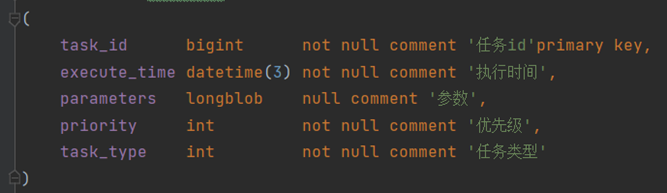
- 实体类
@Data
@TableName("taskinfo")
public class Taskinfo implements Serializable {

    private static final long serialVersionUID = 1L;

    /**
     * 任务id
     */
    @TableId(type = IdType.ID_WORKER)
    private Long taskId;

    /**
     * 执行时间
     */
    @TableField("execute_time")
    private Date executeTime;

    /**
     * 参数
     */
    @TableField("parameters")
    private byte[] parameters;

    /**
     * 优先级
     */
    @TableField("priority")
    private Integer priority;

    /**
     * 任务类型
     */
    @TableField("task_type")
    private Integer taskType;


}
- taskinfo_logs 任务日志表
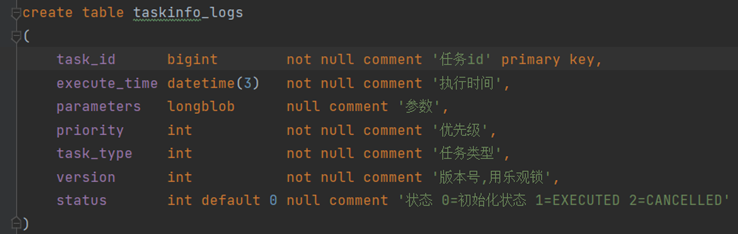
- 实体类
@Data
@TableName("taskinfo_logs")
public class TaskinfoLogs implements Serializable {

    private static final long serialVersionUID = 1L;

    /**
     * 任务id
     */
    @TableId(type = IdType.ID_WORKER)
    private Long taskId;

    /**
     * 执行时间
     */
    @TableField("execute_time")
    private Date executeTime;

    /**
     * 参数
     */
    @TableField("parameters")
    private byte[] parameters;

    /**
     * 优先级
     */
    @TableField("priority")
    private Integer priority;

    /**
     * 任务类型
     */
    @TableField("task_type")
    private Integer taskType;

    /**
     * 版本号,用乐观锁,每次更新完数据后,MybatisPlus会对该字段自增,实现乐观锁效果
     *
     * update taskinfo_logs set status=?,version=version+1 where task_id=? and version=?;
     */
    @Version
    private Integer version;

    /**
     * 状态 0=int 1=EXECUTED 2=CANCELLED
     */
    @TableField("status")
    private Integer status;


}
3、在启动类中添加mybatis-plus开启乐观锁支持:
/**
     * mybatis-plus乐观锁支持
     * @return
     */
@Bean
public MybatisPlusInterceptor optimisticLockerInterceptor(){
    MybatisPlusInterceptor interceptor = new MybatisPlusInterceptor();
    interceptor.addInnerInterceptor(new OptimisticLockerInnerInterceptor());
    return interceptor;
}
3、添加任务
- 定义ScheduleConstants常量类
/**
 * 任务状态常量类
 */
public class ScheduleConstants {

    //初始化状态
    public static final int SCHEDULED=0;

	//已执行状态
    public static final int EXECUTED=1;

	//已取消状态
    public static final int CANCELLED=2;

	//未来数据key前缀
    public static String FUTURE="future:";

	//当前数据key前缀
    public static String TOPIC="topic:";
}
- 定义TaskTypeEnum枚举类
@Getter
@AllArgsConstructor
public enum TaskTypeEnum {

    WM_NEWS(1001, 1,"自媒体文章"),
    FETCH_NEWS(1002, 2,"爬虫文章");
    //任务类型
    private final int taskType;
    //任务优先级
    private final int priority;
    //任务说明
    private final String desc;
}
序列化工具对比
- JdkSerialize:java内置的序列化能将实现了Serilazable接口的对象进行序列化和反序列化, ObjectOutputStream的writeObject()方法可序列化对象生成字节数组
- **Protostuff:**google开源的protostuff采用更为紧凑的二进制数组,表现更加优异,然后使用protostuff的编译工具生成pojo类
Protostuff需要引导依赖:
<dependency>
    <groupId>io.protostuff</groupId>
    <artifactId>protostuff-core</artifactId>
    <version>1.6.0</version>
</dependency>

<dependency>
    <groupId>io.protostuff</groupId>
    <artifactId>protostuff-runtime</artifactId>
    <version>1.6.0</version>
</dependency>
- 定时任务业务层接口
/**
 * 定时任务业务接口
 */
public interface TaskService {

    /**
     * 添加任务
     * @param task   任务对象
     * @return       任务id
     */
    long addTask(Task task) ;
}
- 业务层实现类
@Slf4j
@Service
public class TaskServiceImpl implements TaskService {

    @Autowired
    private TaskInfoMapper taskInfoMapper;

    @Autowired
    private TaskInfoLogsMapper taskInfoLogsMapper;

    @Autowired
    private CacheService cacheService;

    /**
     * redisKeu设计规范:
     *  1. 一定是唯一的
     *  2. 使用 : 拼接
     *  3. redisKey要包含业务数据
     *  例如:学生的数据列表 students:list
     *       指定id的学生数据 student:001
     *
     * 新增任务
     *
     * @param task   任务对象
     * @return
     */
    @Override
    public long addTask(Task task) {
        // 1. 把任务信息添加到数据库中
        saveTaskToDB(task);
        // 3. 把任务保存到Redis中
        saveTaskToCache(task);

        return task.getTaskId();
    }

    /**
     * 把当前任务添加到 当前任务队列缓存
     * 把未来任务添加到 未来任务队列缓存
     *
     * @param task 任务对象
     */
    private void saveTaskToCache(Task task) {
        // 3.1 获取任务的执行时间
        long executeTime = task.getExecuteTime();
        // 3.2 获取系统当前时间
        long currentTime = DateTime.now().getMillis();

        // 任务执行时间小于等于当前系统时间(任务执行时间已到,添加任务到当前任务队列)
        if (executeTime <= currentTime){
            //当前队列redisKey的设计格式:当前队列标识:任务类型:任务优先级 topic:1001:1
            String redisKey=ScheduleConstants.TOPIC+ task.getTaskType()+":"+ task.getPriority();
            // 把任务添加到当前任务队列
            cacheService.lLeftPush(redisKey, JSON.toJSONString(task) );
            log.info("添加任务到当前队列成功 ===> {}",task.getTaskId());
        }else {
            // 任务时间大于当前系统时间(任务时间未到,添加任务到未来任务队列)
            // 未来队列redisKey的设计格式:当前队列标识:任务类型:任务优先级 future:1001:1
            String redisKey=ScheduleConstants.FUTURE+ task.getTaskType()+":"+ task.getPriority();
            // 把未来任务添加到未来队列中,并设置任务的执行时间
            cacheService.zAdd(redisKey,JSON.toJSONString(task), executeTime);
            log.info("添加任务到未来队列成功 ===> {}",task.getTaskId());
        }
    }

    /**
     * 保存任务和任务日志到数据库中
     * @param task 任务对象
     * @return 任务对象
     */
    private void saveTaskToDB(Task task) {

        // 1.1 创建taskinfo对象
        Taskinfo taskinfo = new Taskinfo();
        // 1.2 把task对象复制给taskinfo
        BeanUtils.copyProperties(task,taskinfo);
        // 1.3 转换执行时间
        taskinfo.setExecuteTime(new Date(task.getExecuteTime()));
        // 1.4 添加任务到数据库
        taskInfoMapper.insert(taskinfo);

        // 2.把任务日志添加到数据库中
        // 2.1 创建TaskinfoLogs对象
        TaskinfoLogs taskinfoLogs = new TaskinfoLogs();
        // 2.2 把task对象复制给taskinfoLogs
        BeanUtils.copyProperties(taskinfo,taskinfoLogs);
        // 2.3 初始化乐观锁版本号
        taskinfoLogs.setVersion(1);
        // 2.4 初始化任务状态,待执行
        taskinfoLogs.setStatus(ScheduleConstants.SCHEDULED);
        // 2.5 设置任务id
        task.setTaskId(taskinfo.getTaskId());
        // 2.6 把任务日志存储到数据库中
        taskInfoLogsMapper.insert(taskinfoLogs);
        log.info("添加任务到数据库中成功 ===> {}",task.getTaskId());
    }
}
二、未来任务定时刷新
1、定时支持
在线生成corn: https://cron.qqe2.com/
@Scheduled(cron = "0 */1 * * * ?") 每一分钟执行一次
注意在启动类上添加注解
Scheduled 需要开启 @EnableScheduling //开启任务调度
2、reids key值匹配
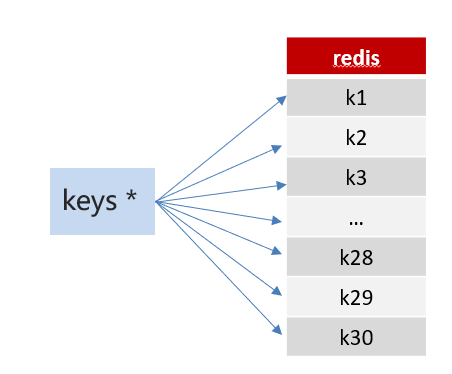
- 方案1:keys 模糊匹配
keys的模糊匹配功能很方便也很强大,但是在生产环境需要慎用!开发中使用keys的模糊匹配却发现redis的CPU使用率极高,所以公司的redis生产环境将keys命令禁用了!redis是单线程,会被堵塞
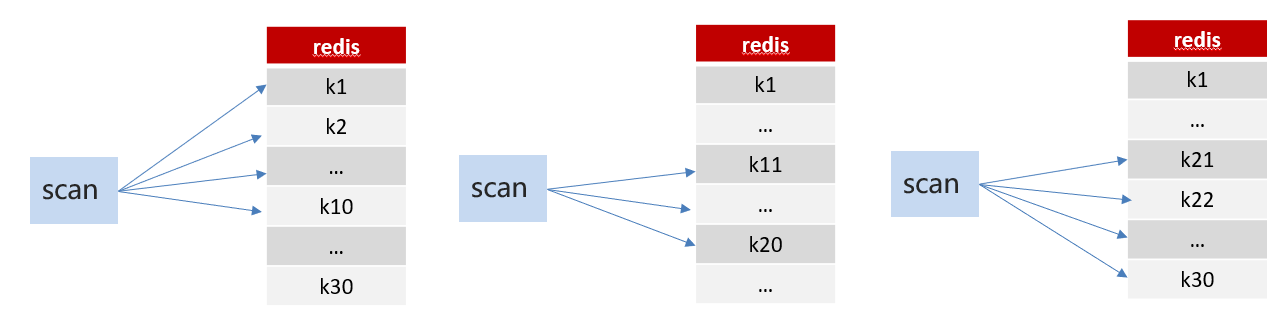
- 方案2:scan
SCAN 命令是一个基于游标的迭代器,SCAN命令每次被调用之后, 都会向用户返回一个新的游标, 用户在下次迭代时需要使用这个新游标作为SCAN命令的游标参数, 以此来延续之前的迭代过程。
3、未来任务定时刷新
- 在TaskServiceImpl中添加方法
    /**
     * 定时任务:定时刷新未来任务队列缓存里的任务到当前任务队列缓存
     */
    @Scheduled(cron = "0/1 * * * * ?")
    public void refreshTask() {
        // 1. 获取未来队列中的任务
        Set<String> zSetKeySet = cacheService.scan(ScheduleConstants.FUTURE + "*");
        // 2. 遍历未来队列的KEY
        if (!zSetKeySet.isEmpty()) {
            for (String zSetKey : zSetKeySet) {
                // 3. 根据每个KEY从未来队列中取出执行时间已到的任务
                Set<String> taskSet = cacheService.zRangeByScore(zSetKey, 0, DateTime.now().getMillis());
                if (!taskSet.isEmpty()) {
                    // 4. 将取出的任务从未来队列中删除
                    cacheService.zRemove(zSetKey, taskSet);
                    // 切割未来队列的key,拼接出当前队列key
                    String[] split = zSetKey.split(":");
                    // 拼接当前队列的redisKey
                    String listKey = ScheduleConstants.TOPIC + split[1] + ":" + split[2];
                    // 5. 把取出的任务添加到当前队列
                    cacheService.lLeftPushAll(listKey, taskSet);
                }
            }
        }
    }
4、Redis管道优化
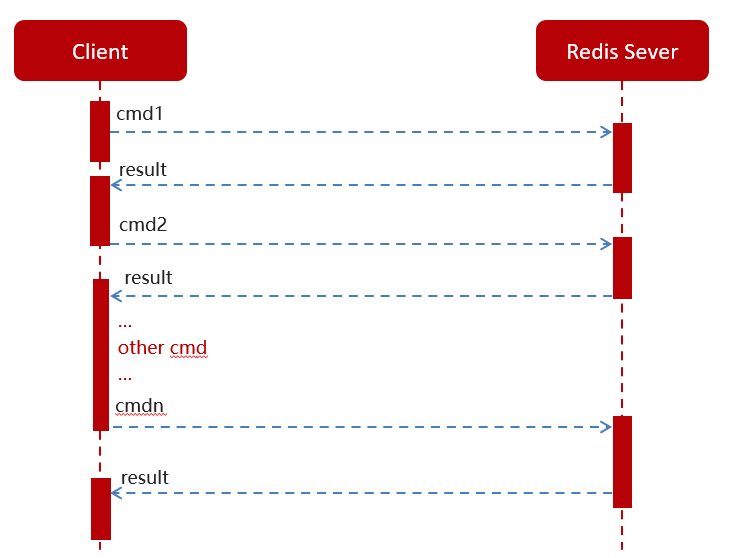
- 普通redis客户端和服务器交互模式
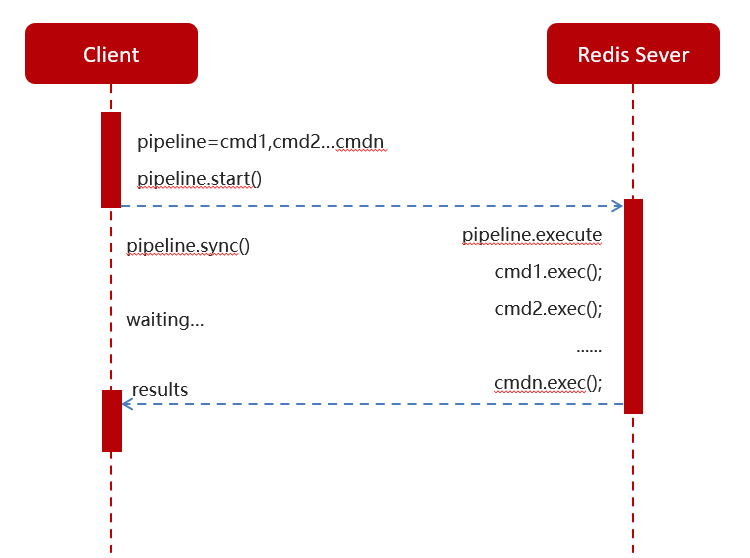
- Pipeline请求模型
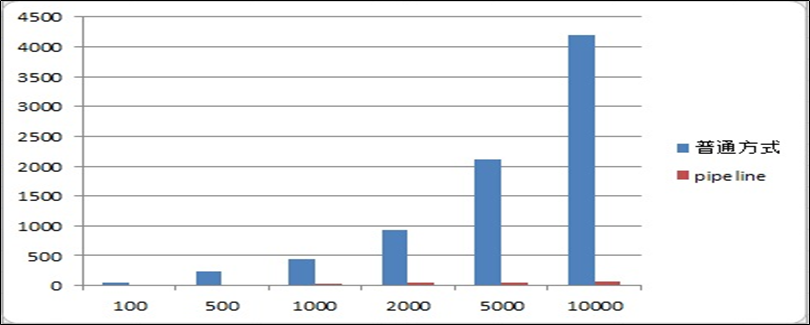
- 官方测试结果数据对比
-** 优化未来任务定时刷新**
    /**
     * 定时任务:定时刷新未来任务队列缓存里的任务到当前任务队列缓存
     */
    @Scheduled(cron = "0/1 * * * * ?")
    public void refreshTask() {
        // 1. 获取未来队列中的任务
        Set<String> zSetKeySet = cacheService.scan(ScheduleConstants.FUTURE + "*");
        // 2. 遍历未来队列的KEY
        if (!zSetKeySet.isEmpty()) {
            for (String zSetKey : zSetKeySet) {
                // 3. 根据每个KEY从未来队列中取出执行时间已到的任务
                Set<String> taskSet = cacheService.zRangeByScore(zSetKey, 0, DateTime.now().getMillis());
                // 使用Redis管道技术
                cacheService.getstringRedisTemplate().executePipelined(new RedisCallback<Object>() {
                    @Override
                    public Object doInRedis(RedisConnection redisConnection) throws DataAccessException {
                        if (!taskSet.isEmpty()) {
                            // 4. 将取出的任务从未来队列中删除
                            cacheService.zRemove(zSetKey, taskSet);
                            // 切割未来队列的key,拼接出当前队列key
                            String[] split = zSetKey.split(":");
                            // 拼接当前队列的redisKey
                            String listKey = ScheduleConstants.TOPIC + split[1] + ":" + split[2];
                            // 5. 把取出的任务添加到当前队列
                            cacheService.lLeftPushAll(listKey, taskSet);
                        }
                        return null;
                    }
                });
            }
        }
    }
5、线程池优化
-
参考wemedia导入 ThreadPoolConfig类到config包下
-
定时刷新任务TaskRefreshService业务层接口
/**
 * @Author :leaflei
 * @Version: 1.0
 * @Description :定时刷新任务
 */
public interface TaskRefreshService {
    /**
     * 异步刷新任务
     * @param zSetKeySet 未来队列的key集合
     */
    void refreshTask(Set<String> zSetKeySet);
}
- 定时刷新任务TaskRefreshServiceImpl业务层实现类
/**
 * @Author :leaflei
 * @Version: 1.0
 * @Description :定时刷新任务
 */
@Service
public class TaskRefreshServiceImpl implements TaskRefreshService {

    @Autowired
    private CacheService cacheService;

    /**
     * 异步任务,定时刷新
     *
     * @param zSetKeySet 未来队列的key集合
     */
    @Async("taskExecutor")
    @Override
    public void refreshTask(Set<String> zSetKeySet) {
        for (String zSetKey : zSetKeySet) {
            // 3. 根据每个KEY从未来队列中取出执行时间已到的任务
            Set<String> taskSet = cacheService.zRangeByScore(zSetKey, 0, DateTime.now().getMillis());
            // 使用Redis管道技术
            cacheService.getstringRedisTemplate().executePipelined(new RedisCallback<Object>() {
                @Override
                public Object doInRedis(RedisConnection redisConnection) throws DataAccessException {
                    if (!taskSet.isEmpty()) {
                        // 4. 将取出的任务从未来队列中删除
                        cacheService.zRemove(zSetKey, taskSet);
                        // 切割未来队列的key,拼接出当前队列key
                        String[] split = zSetKey.split(":");
                        // 拼接当前队列的redisKey
                        String listKey = ScheduleConstants.TOPIC + split[1] + ":" + split[2];
                        // 5. 把取出的任务添加到当前队列
                        cacheService.lLeftPushAll(listKey, taskSet);
                    }
                    return null;
                }
            });
        }
    }
}
- 在TaskServiceImpl的refreshCache方法中提交异步任务到线程池
    @Autowired
    private TaskRefreshService taskRefreshService.;

    /**
     * 定时任务:定时刷新未来任务队列缓存里的任务到当前任务队列缓存
     */
    @Scheduled(cron = "0/1 * * * * ?")
    public void refreshTask() {
        // 1. 获取未来队列中的任务
        Set<String> zSetKeySet = cacheService.scan(ScheduleConstants.FUTURE + "*");
        // 2. 遍历未来队列的KEY
        if (!zSetKeySet.isEmpty()) {
            // 使用线程池,异步刷新任务,
            taskRefreshService.refreshTask(zSetKeySet);
        }
    }
本文是原创文章,采用 CC BY-NC-ND 4.0 协议,完整转载请注明来自 leaflei
阅读建议
评论
匿名评论
隐私政策
你无需删除空行,直接评论以获取最佳展示效果

最近发布